


 Main Menu
What makes someone want to turn on their camera during a virtual training?
For many facilitators, trainers, educators, and meeting leaders, the instinct is to simply ask, or sometimes require, people to show their faces. But according to virtual learning expert Kassy LaBorie, there’s a big difference between getting someone to comply and creating an experience they genuinely want to join.
During her Screen Queen: Camera on, confidence up session at the ScreenPal Innovative Learning Summit, Kassy challenged attendees to rethink what camera confidence and virtual engagement really mean.
Her message wasn’t about finding the perfect lighting, buying better equipment, or memorizing a list of webcam best practices. Instead, she focused on something more fundamental: the experience we create for the people on the other side of the screen.
Kassy LaBorie shares practical ways to make virtual training feel more human, participatory, and worth showing up for.
In this article
- From camera avoidance to camera confidence
- Learn the tools, then get over the tools
- Why virtual training engagement isn’t a button
- Make breakout rooms less awkward
- Invite people onto camera instead of demanding it
- Make recorded training videos feel more human
- The five experience moments that create connection
- Invitation
- Recognition
- Contribution
- Curiosity
- Meaning
- Make space for silence
- Camera confidence starts with human needs
- You are the experience
From avoiding the camera during virtual training to making it feel normal
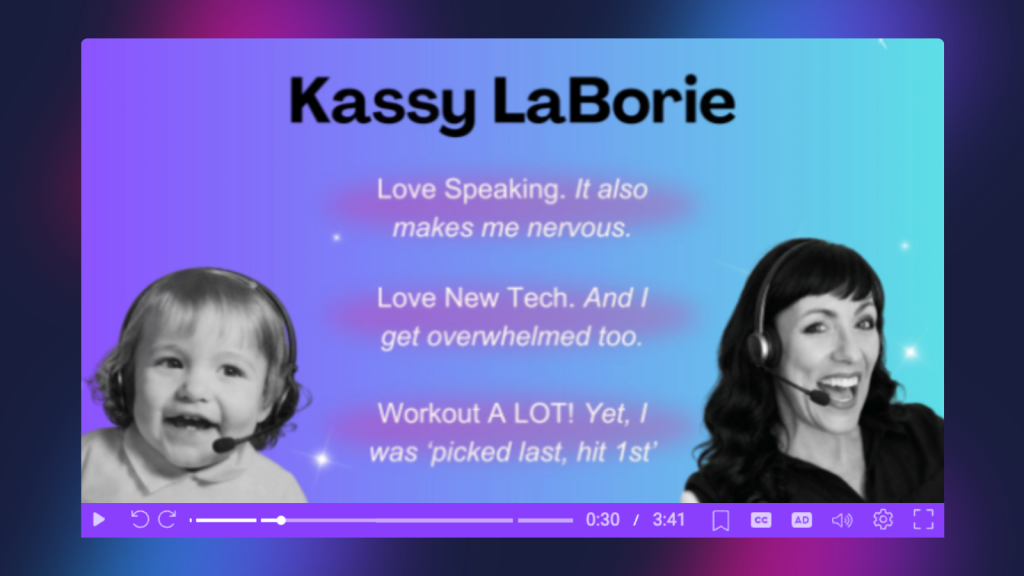
Kassy has been presenting virtually since the late 1990s, when she worked as a product trainer at WebEx. Back then, using a webcam during an online session wasn’t always practical. Bandwidth was limited, technology was unreliable, and turning on video could sometimes cause the entire system to struggle. That meant early virtual facilitators had to learn how to connect with an audience without relying heavily on video.
Fast-forward to today, and the technology has dramatically improved. Cameras are built into our laptops and phones, internet connections are stronger, and video meetings have become part of everyday work. Yet many people still don’t want to turn their cameras on.
Kassy understands that hesitation because she experienced it herself. Over time, however, she moved from someone who would rather stay off camera to someone who appears on camera constantly.
The goal, she explained, isn’t necessarily to love being on camera. It’s to make it feel normal. And the more comfortable presenters become with the technology, the easier it becomes to stop focusing on the camera and start focusing on the person on the other side of it.
Learn the virtual training tools, use the tools, then get over the tools
One of Kassy’s guiding principles for virtual communication is simple: Learn the tools. Use the heck out of the tools. Then get over the tools.
Technology matters. A reliable camera, microphone, virtual meeting platform, interactive presentation tool, or video creation platform makes communication possible. But knowing how to click a poll button doesn’t automatically make a session engaging.
Kassy encouraged attendees to think about how naturally we use our phones today. Once a tool becomes familiar enough, we stop consciously thinking about every button we press. We simply use it to accomplish what we want to do.
The same should happen with virtual presentation and video tools. Once the technology becomes familiar, presenters can spend less energy thinking about the mechanics and more energy finding the personality, quirks, creativity, and presence that make them uniquely themselves. That’s where connection starts.
Engagement during virtual training is not a button
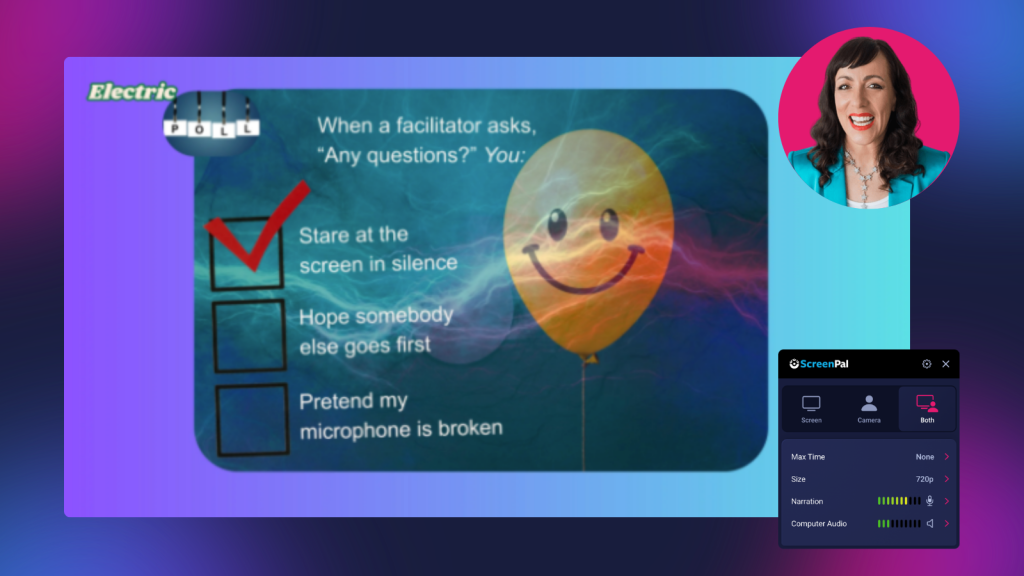
Polls. Breakout rooms. Reactions. Webcams. Chat. All of these can support engagement, but none of them create engagement on their own. Kassy demonstrated the difference by comparing a traditional poll with what she calls an “electric poll.”
A facilitator might ask: How important is engagement? Participants click “very important,” “somewhat important,” or “not important.” Technically, they interacted. But did the question create a meaningful experience?
Instead, Kassy asked attendees to consider what actually happens when a facilitator says, “Any questions?” Are you eager to speak? Waiting for someone else to go first? Hoping the facilitator moves on?
Suddenly, the poll reveals something about the participants themselves. It creates humor, conversation, and a shared understanding of an experience nearly everyone recognizes. Even changing the wording of a question can help.
Rather than asking the closed-ended, “Any questions?” Kassy suggested asking: “What questions do you have?” It’s a small shift, but it changes the invitation. The lesson applies well beyond polling: interaction for interaction’s sake isn’t enough. Every interaction should help create a specific experience.
That same principle can carry into the recorded version of a session. With ScreenPal’s interactive quiz features, facilitators can add questions directly to a video, turning an on-demand recording into a more active learning experience. Multiple-choice, true/false, short-answer, polls, and ratings can prompt viewers to reflect, check their understanding, share a perspective, or make a prediction before continuing.
The key is to think beyond simply asking, “Were you paying attention?” An intentional quiz question can recreate some of the participation that makes a live session memorable. Ask viewers what they would do in a scenario, invite them to predict what comes next, or use a poll to help them connect the content to their own experiences.
The technology creates the opportunity to interact. The question you ask creates the experience.
Make virtual training breakout rooms less awkward
Breakout rooms are another perfect example. Simply sending people into small groups doesn’t guarantee meaningful conversation. Anyone who has entered a breakout room only to hear several seconds of uncomfortable silence knows that.
Kassy suggested reducing that awkwardness by giving participants time to think before they enter the breakout.
For example, instead of saying, “Introduce yourself and discuss great presenters,” try giving participants a moment to independently think about the best presenter they’ve experienced and identify one thing that person did to make them feel connected.
Then give the breakout group a specific task:
- Share examples.
- Identify three ideas.
- Choose one technique every facilitator should steal.
- Return prepared to share one highlight.
Now participants enter the room with something to say and something to accomplish. The focus shifts away from the discomfort of meeting strangers on camera and toward completing a shared task.
ScreenPal can help facilitators extend this strategy beyond the live session, too. Before a workshop or training, facilitators could email a short ScreenPal video introducing the breakout topic and prompting participants to reflect on a question in advance. Facilitators can combine webcam and screen recordings, captions, annotations, and other visual elements to make the instructions clear and give participants time to arrive with an idea already forming.
You could even use a short ScreenPal video immediately before opening the breakout rooms to visually reinforce the prompt, instructions, and expected outcome. Instead of participants entering a room wondering, “Wait, what are we supposed to be talking about,” everyone starts with the same clear direction.
And something interesting often happens as a result: people turn their cameras on naturally because they have a reason to connect. The goal isn’t to force participation, it’s to design an experience that makes participation feel easier.
Invite people onto camera during virtual training instead of demanding it
Throughout the session, Kassy emphasized the importance of creating emotional safety around camera use.
Most of us have probably heard some version of: “Everyone needs to have their cameras on,” “I need to see your faces,” “it’s awkward when I’m the only one on camera,” or “we’ll wait.” Those commands may result in more cameras appearing on screen, but that doesn’t necessarily mean people are engaged.
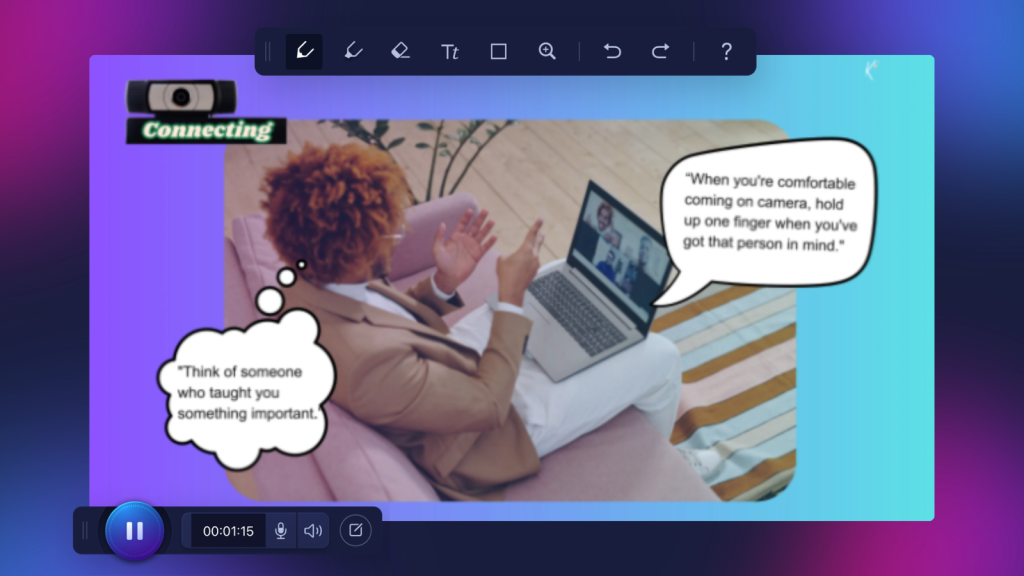
Kassy takes a different approach. She might ask participants to think of someone who taught them something important. After giving them a moment to reflect, she could say: “When you’re comfortable coming on camera, hold up one finger when you have that person in mind.”
The camera now has a purpose. Participants aren’t turning it on simply to prove they’re present. They’re using it to contribute to a shared moment.
Kassy also offered a practical middle ground for camera fatigue: encourage participants to come on camera when they’re speaking, then allow them to turn it off again when they need a break.
That flexibility can carry over to the recorded version of a session, too. With ScreenPal, you can hide your camera recording after the fact, including using the cut editing tool to remove breakout room sections. This gives facilitators the freedom to use their camera intentionally; appearing when facial expressions and human connection add value, while removing camera footage from portions where it may be distracting, unnecessary, or a privacy issue.
Whether the experience is live or recorded, the same principle applies: being on camera should have a purpose. The goal isn’t constant visibility. It’s meaningful connection.
The same virtual training skills make recorded videos better
Although much of the session focused on live virtual meetings and training, Kassy pointed out that the same techniques apply when creating recorded video.
When you record a training video, instructional video, or social media clip, you may physically be alone. But your video shouldn’t feel like you’re alone.
The habits developed during live virtual facilitation; speaking conversationally, looking into the camera during important moments, imagining the person on the other side, inviting participation, and communicating with intention, can make recorded videos feel much more human.
For Kassy, practicing these skills in live environments has helped her become better when recording by herself.
When answering a participant question during the Summit, for example, she explained that she intentionally looks directly into the camera during conversational moments. When she moves back into planned presentation content, she allows herself to naturally look elsewhere. That small distinction can make video feel less like a performance and more like a conversation.
Five virtual training experience moments that create connection
So how do you create the kind of virtual environment where people actually want to participate?
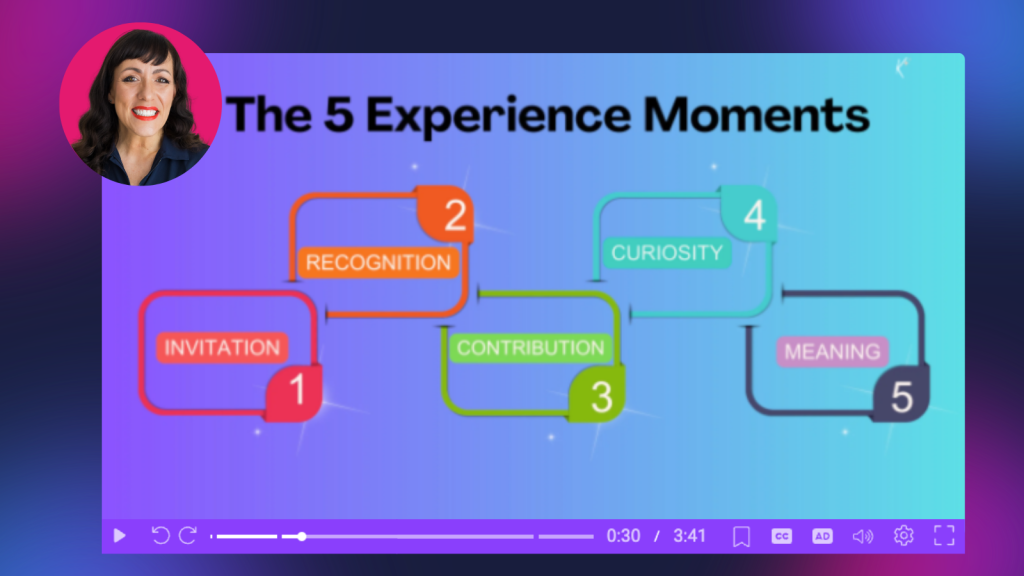
Kassy shared five experience moments facilitators can intentionally build into virtual sessions:
- Invitation
- Recognition
- Contribution
- Curiosity
- Meaning
Together, they move the focus away from forcing participation and toward designing an experience people want to be part of.
1. Invitation: Give people a way into the experience
Kassy’s guiding question for invitation is: What did I just say or do that I could have let the audience say or do instead?
Imagine you have five tips for looking better on webcam. The traditional approach would be to put the five tips on a slide and explain each one.
Instead, Kassy might ask participants to read the list and annotate the slide beside the tips they want to discuss. They could add their names next to something they have a question about, disagree with, or have a story about.
Now the audience helps determine where the conversation goes. The content hasn’t necessarily changed. The experience has.
2. Recognition: Show people that their participation during your virtual training matters
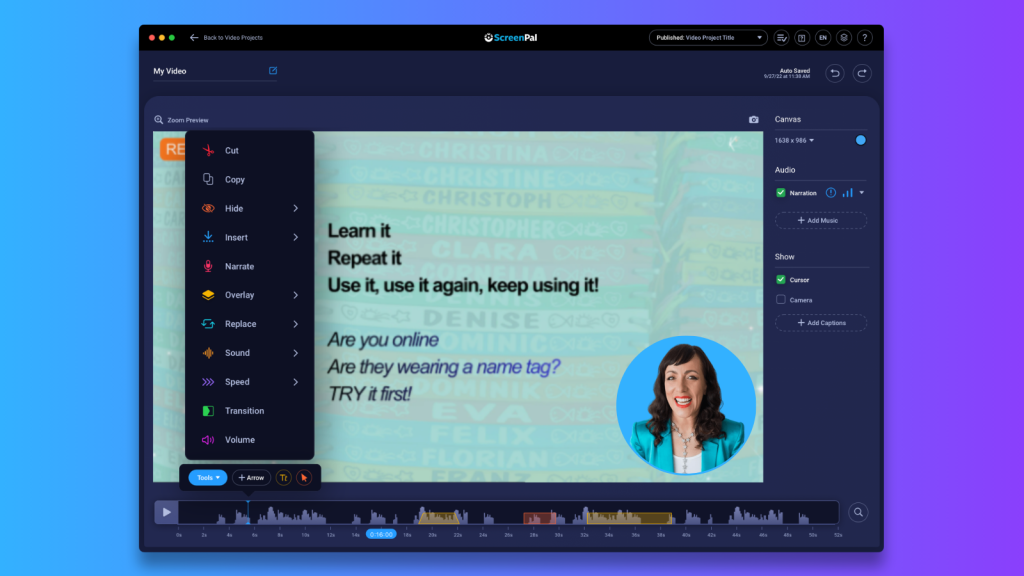
Inviting participation is only the beginning. When someone chooses to contribute, recognize it. One of the simplest ways to do that is by using their name.
Kassy encouraged presenters not to avoid someone’s name simply because they’re worried about pronouncing it incorrectly. Make an effort, allow the person to correct you, and use their name again. She even asked Summit attendees to type their names phonetically as an interactive exercise. For Kassy, learning and using someone’s name communicates respect. It tells participants that their presence is noticed.
ScreenPal can help facilitators get names right before the live session even begins. Create a ScreenPal Channel and invite participants to record a short video introducing themselves using the Channel recorder, which doesn’t require them to log in. Ask each person to share their name, role, and perhaps one quick response to an icebreaker or session-related prompt. The facilitator gets to hear each participant say their own name, one of the best ways to learn the correct pronunciation, while participants get a low-pressure opportunity to introduce themselves before meeting live.
As an added benefit, those short introductions can begin building familiarity before everyone enters the same virtual room. Instead of joining a session full of complete strangers, participants may already recognize a few names and faces.
Recognition can also mean acknowledging a chat comment, responding to an annotation, reacting to an idea, or simply showing participants that what they contributed influenced the conversation. The more participants see evidence that their presence and contributions matter, the more reason they have to keep contributing.
3. Contribution: Let participants help create the experience during virtual training
Kassy shared a quote she has carried with her since her time working with Dale Carnegie: “People will support a world they help create.” That principle can completely change the way a facilitator approaches a session.
During a previous webinar on five keys to virtual training success, for example, Kassy had her own preferred order for presenting the topics. But instead of deciding the sequence herself, she asked participants to vote for the two topics they most wanted to discuss.
Their responses helped shape what happened next. Giving participants genuine choices creates ownership. Their contribution isn’t decorative, it affects the experience.
4. Curiosity: Give people a reason to lean in
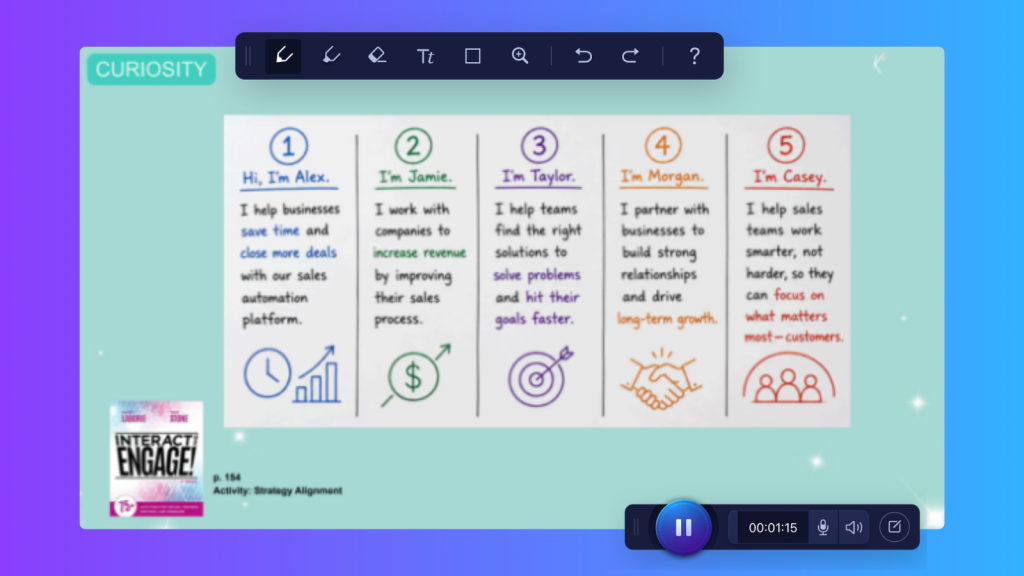
One of Kassy’s favorite places to take an audience is: “I never thought about it that way.” Curiosity can come from a surprising poll result, an unexpected statistic, a creative visual, a question, a story, or an activity that reframes something familiar. And curiosity has an important connection to camera confidence.
When people are genuinely interested in what’s happening, they spend less time thinking, I’m on camera. Their attention moves toward the conversation, problem, activity, or discovery happening in front of them. The camera takes a back seat. Instead of thinking about how they look, participants start thinking about what they want to say.
A ScreenPal quiz with a reflective short-answer question would be a strong fit here. Rather than letting the recording simply end, you can build Kassy’s reflection exercise directly into the on-demand experience. You could also follow it with an annotation button that directs viewers to a resource or next step.
Here’s how I’d incorporate it:
5. Meaning: Give people time to decide what matters
The end of a session shouldn’t simply be: “Thanks for being here!” End meeting. Kassy intentionally reserves time for participants to process what they’ve experienced.
During the Summit, she asked attendees to consider which of the five experience moments was most missing from their current sessions.
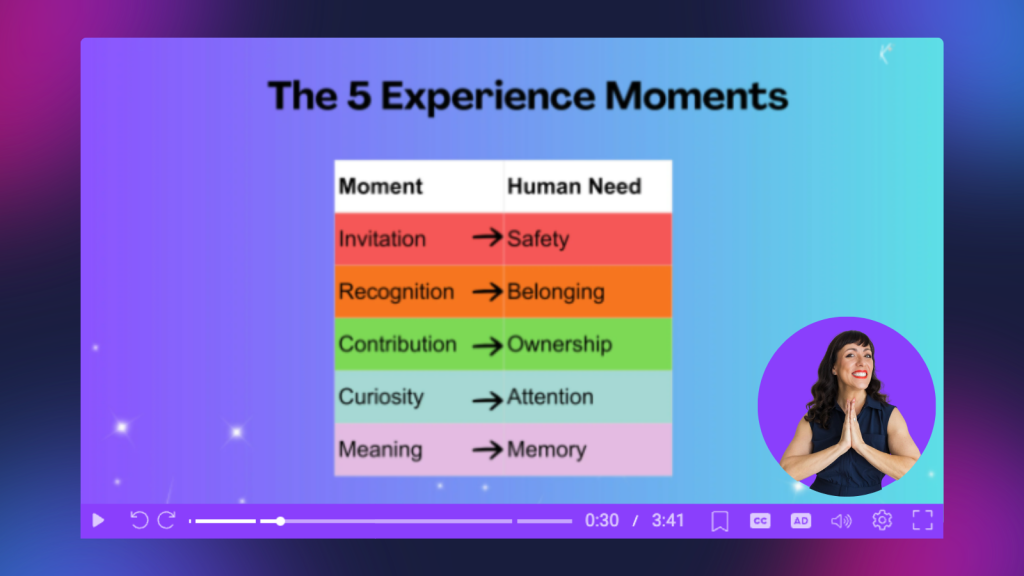
Then she connected those moments to deeper human needs:
- Invitation → Safety
- Recognition → Belonging
- Contribution → Ownership
- Curiosity → Attention
- Meaning → Memory
Participants identified the area they wanted to strengthen and then chose one action they could take to address that need. That reflection transforms information into something personally relevant. Because, as Kassy reminded attendees, people remember what matters to them.
For an on-demand recording, ScreenPal’s interactive quiz features can bring that same moment of reflection to viewers who weren’t there live. Add a question near the end of the recording asking viewers to identify which experience moment is most missing from their own sessions: invitation, recognition, contribution, curiosity, or meaning.
Then go one step further with a short-answer question: What is one thing you’ll do differently in your next session?
Instead of passively reaching the end of the recording and closing the tab, viewers have an intentional pause to process what they learned and connect it to their own work. You can even add an annotation button with a call to action that directs them to a related resource or next step.
The live audience and the on-demand audience may experience the session at different times, but the goal can remain the same: don’t just end the content. Give people a reason to decide what they’ll carry with them.
Make space for silence during virtual trainings
There was another important lesson woven throughout Kassy’s interactive session: wait. When facilitators ask a question and don’t immediately receive an answer, silence can feel painfully long. Our instinct is often to fill it. Kassy encouraged presenters to resist that urge.
Participants need time to hear the question, think, formulate an answer, decide whether they want to respond, find the right button, and actually speak.
Sometimes Kassy simply counts backward from five in her head. That tiny pause can be enough to give someone the confidence to raise a hand or ask the first question. And once one person contributes, others often follow.
The same idea applies to recorded content. With ScreenPal’s video editor, you can insert a pause into your recording, intentionally giving viewers a few extra seconds to think before you reveal an answer, continue an explanation, or move on to the next idea. Pair that pause with an on-screen reflection prompt or question, and silence becomes part of the learning experience rather than empty space to edit out.
A useful reminder shared during the conversation was the acronym WAIT: Why Am I Talking? Sometimes engagement needs less talking from the presenter, not more, whether your audience is participating live or watching later.
Camera confidence for virtual training starts with human needs
Near the end of the session, Kassy asked attendees to stop thinking about engagement techniques as isolated tricks, but rather as responses to fundamental human needs.
People want to feel safe. They want to belong. They want to have some ownership over their experience. They want something worth paying attention to. And they want to walk away remembering something that matters.
When those needs are met, turning on a camera becomes far less important than the reason everyone gathered in the first place.
You are the experience
Kassy closed the session by revealing the “secret” she had teased from the beginning. It’s you.
The technology matters, but it isn’t what creates connections. Your choices do.
The invitations you extend. The questions you ask. The silence you allow. The names you remember. The contributions you recognize. The curiosity you create. The moments you give people to reflect.
As Kassy explained, when you own the tools and unleash your presence, your confidence grows, and that confidence helps the people around you feel more comfortable joining the experience, too.
Because compliance is not the same thing as engagement. People may turn on a camera because they’re required to. But genuine connection happens when they want to participate.
Whether you’re leading a webinar, teaching an online class, facilitating virtual training, hosting a meeting, or recording your next ScreenPal video, the goal isn’t simply to get the camera on.
It’s to create something worth showing up for.
About Kassy LaBorie
Kassy LaBorie is a virtual learning expert, speaker, author, and facilitator who has spent decades helping organizations create more engaging and human virtual experiences. Her career in virtual learning dates back to the early days of WebEx, and she has worked extensively in virtual training, facilitation, and learning experience design.
Through her speaking, books, podcast, newsletter, and training, Kassy helps presenters and learning professionals move beyond simply using virtual tools to designing experiences that encourage meaningful participation and connection.
Her work centers on a simple but powerful idea demonstrated throughout her Innovative Learning Summit session: technology can bring people together, but people create the connection.