Main Menu
For L&D leaders, onboarding isn’t just about welcoming new hires, it’s about accelerating performance.
In today’s hybrid and remote workplaces, onboarding videos are a great way to scale training and keep things consistent. The problem is, they often end up feeling like passive orientation content instead of actually helping people learn how to do their jobs well.
Well-designed onboarding videos can:
- Reduce time-to-proficiency
- Reinforce role expectations
- Improve high-quality knowledge retention
- Support accessibility and inclusion
- Create measurable learning touchpoints
The difference lies in instructional design.
Keep reading for five evidence-informed strategies to create onboarding videos that drive real learning outcomes, not just content consumption, including:
- Design for cognitive load and microlearning
- Move from passive watching to active learning
- Align onboarding content to real performance expectations
- Prioritize accessibility and inclusive design
- Reinforce learning and measure impact
1. Design onboarding for cognitive load and microlearning
One of the most common onboarding mistakes is trying to cover too much in one sitting. When new hires are flooded with information all at once, especially dense, policy-heavy content, it’s hard for any of it to stick. Learning science backs this up: when cognitive load gets too high, comprehension drops, and confidence usually takes a hit too.
There’s also real-world data that supports breaking things up. In a Stanford study, researcher Lagerstrom analyzed how students engaged with 50-75 minute recorded lectures. While most students did watch the full videos, they rarely did it in one go. Instead, they watched in shorter bursts, typically around 12-13 minutes per session, with an average of 17-20 minutes. Based on this, he concluded that instructional videos are most effective when they’re under 12 minutes, and ideally no longer than 20.
The takeaway for onboarding is simple: don’t try to do everything at once. Break content into structured, bite-sized pieces that are easier to absorb, revisit, and apply. In other words, design onboarding as microlearning, not a marathon.
Best practices include:
- Break onboarding into focused modules (3-7 minutes each)
- Align each video to a specific learning objective
- Sequence content progressively
- Prioritize “need-to-know” over “nice-to-know” information
For example:
- Module 1: Company mission and values
- Module 2: Role-specific workflows
- Module 3: Tools and systems overview
- Module 4: Compliance and required training
Chunking content allows learners to process information more effectively and revisit modules as needed, especially in hybrid and remote environments where self-paced reinforcement is essential.
How ScreenPal supports microlearning design
ScreenPal makes it simple for L&D teams to operationalize these instructional design principles without adding production complexity.
Keep videos short and digestible
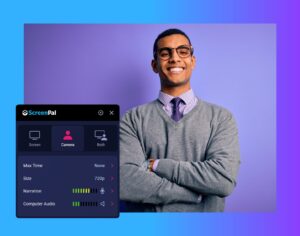
After launching the recorder, select Max Time and set a maximum recording length of 3-7 minutes. This built-in constraint helps ensure your content stays focused and aligned to microlearning best practices.
Align videos to objectives and build structured learning paths
You can organize related onboarding videos into a Channel, creating a sequenced learning experience (similar to a playlist). This supports progressive knowledge building and keeps content aligned to defined objectives.
Additionally, ScreenPal’s Channel Recorder feature allows learners to submit video responses directly within the Channel, no login required. This enables:
- Reflection-based assignments
- Scenario responses
- Manager feedback loops
- Demonstrated skill application
By combining short, focused modules with structured sequencing and learner-generated responses, onboarding shifts from information delivery to measurable learning progression.
When designed intentionally, microlearning doesn’t just reduce cognitive overload, it accelerates readiness and confidence. When paired with video-based feedback, it also creates a two-way coaching dynamic where learners can demonstrate skills, receive personalized guidance, and refine their understanding in real time.
2. Move onboarding from passive watching to active learning
Engagement isn’t about flashy animations, it’s about cognitive participation.
If onboarding videos are purely informational, learners may complete them, but they won’t necessarily retain or apply the content. To increase retention and real-world transfer, onboarding must require learners to think, reflect, and respond.
To move from passive consumption to active learning:
- Embed short knowledge checks
- Include reflection prompts (i.e., “How would you handle this scenario?”)
- Add scenario-based examples tied to real job tasks
- Use quick quizzes to reinforce key concepts
This approach leverages retrieval practice, one of the most research-backed strategies for strengthening memory and improving long-term retention. When learners are asked to recall, apply, or explain concepts, neural pathways strengthen, and confidence increases.
Instead of asking new hires to simply “watch and absorb,” give them structured opportunities to pause, process, and demonstrate understanding.
How ScreenPal supports active learning
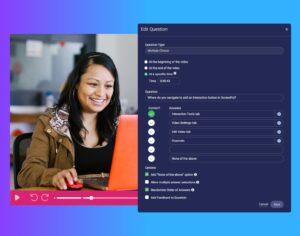
ScreenPal’s interactive features make it easy to transform onboarding videos into measurable learning experiences.
Embed short knowledge checks
Use ungraded poll and rating questions, and enable skip prevention, to require learners to pause and reflect before moving forward. This ensures they actively process the content rather than clicking through.
Include reflection prompts
Embed short-answer questions to prompt deeper thinking. For example:
“How would you respond to this client scenario?” or “What steps would you take in this workflow?” These responses encourage learners to connect content to real experience and can be reviewed by managers or facilitators for qualitative insight.
Add scenario-based examples tied to real job tasks
Overlay or insert videos demonstrating authentic workflows. Leverage subject matter experts (SMEs) to record real anecdotes or model best practices. This bridges the gap between theory and application and strengthens transfer of learning.
Use quizzes within learning Channels to reinforce key concepts
Organizing onboarding content into themed learning channels helps structure the experience and keep learners focused on specific topics. Within each channel, short subject-matter videos can be paired with one or more quick quizzes to reinforce key concepts. Multiple-choice or true/false questions provide immediate feedback through automatic grading, helping confirm understanding while allowing L&D teams to identify knowledge gaps early in the onboarding journey.
By embedding interactive elements directly into onboarding videos, L&D teams can:
- Increase retention
- Surface early misunderstandings
- Create measurable checkpoints
- Support manager follow-up conversations
When onboarding shifts from passive viewing to active participation, it becomes a true performance accelerator, not just a content repository.
3. Align onboarding content to real performance expectations
New hires don’t just need to understand company values, they need clarity on what success looks like in their specific role.
High-impact onboarding videos should answer:
- What does strong performance look like here?
- What are the most common early mistakes?
- What tools or workflows will I use daily?
- How will my performance be measured?
When onboarding content directly reflects real job expectations, it accelerates confidence, reduces uncertainty, and shortens time-to-productivity.
This is where role-based video walkthroughs become especially powerful.
For example:
- A sales enablement module demonstrating CRM workflow best practices
- A customer support onboarding video modeling a successful client interaction
- A manager outlining collaboration norms and communication expectations
- A project-based walkthrough showing how work moves through internal systems
Instead of abstract policies, learners see practical execution. They can visualize expectations, anticipate challenges, and understand how their role contributes to broader business outcomes.
How ScreenPal supports performance-aligned onboarding
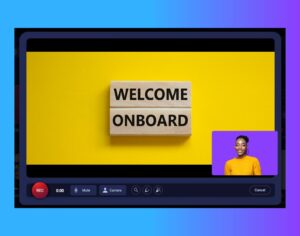
ScreenPal enables L&D teams to create authentic, role-specific training experiences grounded in real workflows, without heavy production complexity.
Create authentic workflow demonstrations
Use screen recording to capture real systems (CRM, LMS, ticketing platforms, internal dashboards) in action. This allows learners to see exactly how tasks are completed, reducing ambiguity and increasing transfer of learning.
The process of recording your screen and making quick refinements is even more streamlined with ScreenPal’s online screen recorder and online video editor, making it easy to update content as systems or processes evolve.
Highlight key behaviors and best practices
Use drawing tools, zoom effects, and visual callouts during recording to emphasize critical steps, common mistakes, or important decision points. These visual cues improve clarity and help reduce early performance errors.
Leverage SMEs for credibility and realism
Invite subject matter experts or managers to record short walkthroughs explaining expectations, modeling best practices, or sharing “what good looks like.” Authentic voice and contextual insights increase learner trust and relevance.
With ScreenPal’s Insert Video feature, you can pause an existing onboarding video, insert a subject matter expert anecdote or demonstration, and seamlessly continue the original recording, no need to re-record the entire module. This makes it easy to layer expertise into your training without increasing production time.
Embed performance checkpoints
Add interactive quiz questions or short-answer reflections within the video to prompt applied thinking, such as:
- “Which step should happen next?”
- “What risk is present in this scenario?”
- “How would you prioritize this request?”
These checkpoints move the experience from demonstration to decision-making practice, reinforcing learning and revealing comprehension gaps.
Provide on-demand reinforcement
Host role-based onboarding modules in organized Channels, allowing new hires to revisit specific workflows during their first 30-90 days. This supports just-in-time learning and reduces manager dependency for repeated explanations.
When onboarding videos are grounded in real job scenarios, and supported by interactive reinforcement, they do more than inform. They prepare.
By connecting values, tools, expectations, and measurable behaviors, L&D teams can transform onboarding from orientation content into scalable performance enablement infrastructure.
4. Prioritize accessibility and inclusive design
Modern L&D strategy requires inclusive learning experiences, not as an afterthought, but as a foundational design principle.
Accessible onboarding videos should include:
- Accurate closed captions
- Downloadable transcripts
- Clear audio quality
- Strong visual clarity (contrast, readable text, intentional layout)
- Mobile compatibility
- Multilingual support when needed
- Audio descriptions for critical visual content
Accessibility isn’t just about compliance. It directly impacts engagement, comprehension, and retention across diverse and global workforces.
For example, captions improve comprehension even for native speakers and are especially valuable in hybrid environments where employees may be learning in shared or distracting spaces.
How ScreenPal supports accessible onboarding
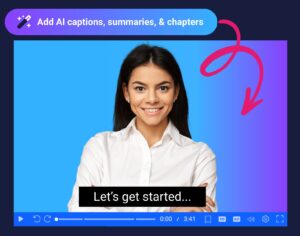
ScreenPal provides built-in tools that make inclusive design practical and scalable for L&D teams.
Accurate captions and multilingual translations
With AI-generated captions, you can quickly create accurate subtitles for any onboarding video. From there, you can translate your content into 140+ languages with just a few clicks.
After uploading your onboarding video to ScreenPal:
- Hover over the video thumbnail and click Manage
- Navigate to Video Settings
- Select additional languages from the dropdown menu
This allows global teams to receive consistent onboarding experiences in their preferred language, without recreating content from scratch.
Downloadable transcripts for reinforcement
Transcripts support review, accessibility accommodations, and spaced reinforcement. You can easily download an AI-generated transcript by clicking the ellipses next to the Video Timeline and selecting Download captions.
Providing transcripts ensures learners can revisit key information, search for specific topics, and reinforce learning beyond the initial viewing.
Multilingual narration with AI text-to-speech
Even if your team doesn’t fluently speak every language represented in your workforce, ScreenPal’s AI text-to-speech narration allows you to generate voiceovers in multiple languages.
Once captions are created, simply select your preferred AI-generated voice and add narration. This ensures your onboarding videos are not only translated visually, but also audibly accessible.
Audio descriptions for visual context
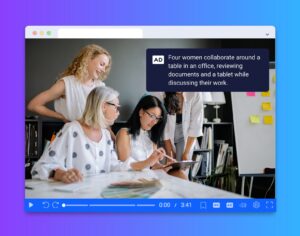
For learners who are blind or have low vision, audio descriptions are essential. When onboarding videos include charts, workflow demonstrations, or on-screen text that conveys critical meaning, those visuals should also be described verbally.
L&D teams can incorporate audio descriptions directly into narration scripts or use ScreenPal’s editing tools to insert additional voiceover segments that explain key on-screen actions (e.g., “The cursor selects the ‘Submit’ button in the top-right corner,” or “A warning message appears indicating missing required fields.”).
This ensures that visual information is not lost, and that all learners can fully understand task-based demonstrations and decision points.
Visual clarity and color accessibility
Clear visuals reduce cognitive friction and support comprehension. When customizing player branding or adding call-to-action buttons and annotations, use ScreenPal’s color contrast checker to ensure appropriate contrast ratios for all learners.
This helps maintain readability and supports accessibility standards across devices and viewing environments.
By leveraging AI-generated captions, translation tools, text-to-speech narration, and built-in accessibility checks, L&D teams can ensure onboarding materials remain:
- Inclusive
- Up-to-date
- Scalable
- Globally consistent
When accessibility is embedded into the design process, onboarding becomes more than compliant, it becomes equitable, effective, and performance-aligned for every learner.
5. Reinforce learning and measure impact
Onboarding doesn’t end when the video does.
If learning stops at content consumption, retention fades quickly. High-impact onboarding strategies extend beyond delivery and build structured reinforcement into the learning journey.
To maximize impact:
- Include a clear next step (knowledge check, manager discussion, applied assignment)
- Reinforce key topics through spaced follow-ups
- Track engagement and quiz completion
- Gather manager feedback on readiness
- Monitor early performance indicators
Effective onboarding videos create measurable checkpoints, not just informational touchpoints.
How ScreenPal supports reinforcement and measurement
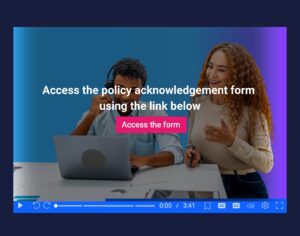
Include clear next steps within the video
Learning momentum increases when next actions are explicit. Use ScreenPal’s call-to-action and annotation buttons to link directly to:
- A follow-up module
- A quiz or assessment
- A scheduling link for a manager check-in
- A policy acknowledgment form
- A role-based assignment
These interactive elements can be placed at any point in the video, guiding learners from awareness to action without disrupting flow.
Reinforce through spaced learning
Instead of delivering all onboarding content on Day 1, use sequenced Channels to release modules over time. This supports spaced reinforcement, a proven method for improving long-term retention and application.
Follow-up videos can revisit critical topics, clarify common errors, or deepen role-specific skills as learners begin applying knowledge in real contexts.
Track engagement and quiz performance
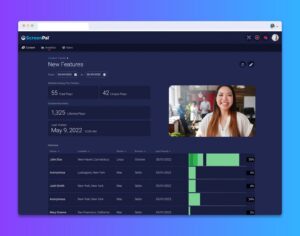
ScreenPal’s analytics dashboard provides visibility into viewer engagement, helping L&D teams understand:
- Who watched the video
- How much they watched
- Where drop-off occurs
For interactive content, the aggregated quiz results summary provides a clear view of completion rates and performance trends. This allows teams to quickly identify knowledge gaps and refine onboarding content accordingly.
Gather manager validation
While quiz data measures comprehension, manager feedback validates performance application. Combine analytics insights with manager check-ins to assess readiness and behavioral transfer.
For example:
- Are new hires executing workflows correctly?
- Are early mistakes decreasing?
- Is ramp time improving compared to previous cohorts?
Turning onboarding into a performance lever
Effective onboarding videos create measurable checkpoints in the learning journey.
For example:
- Quiz scores can reveal comprehension gaps
- Completion data can signal engagement levels
- Manager feedback can validate behavioral application
- Performance indicators can confirm time-to-proficiency improvements
L&D leaders are increasingly accountable for outcomes such as time-to-productivity, early retention, and performance benchmarks. Video-based onboarding should directly support those metrics, not operate as standalone content.
By combining video, interactive reinforcement, and actionable analytics, onboarding evolves from a one-time orientation asset into a scalable performance enablement system.
Final thoughts
Effective onboarding videos aren’t just about delivering information, they’re about helping people get up to speed and confident in their roles faster.
When you apply solid instructional design, make content accessible, reinforce key ideas, and actually measure what’s working, onboarding shifts from a box to check into something that drives real impact.
And in a competitive talent landscape, helping new hires ramp up quickly and feel engaged early on isn’t a nice-to-have, it’s critical.
When onboarding is designed with intention, video becomes one of the most powerful tools in your L&D toolkit.
If you’re looking for practical ways to put this into action, you can download our L&D use case resource for real-world examples and ideas you can start using right away.